

I know that website speed is one of the most important factors for online success. A fast website creates a better user experience, reduces bounce rates, improves conversion rates, and helps search engines understand that my site provides value to visitors.
Core Web Vitals are Google's key performance metrics that measure real-world user experience. Today, the three most important metrics are Largest Contentful Paint (LCP), Interaction to Next Paint (INP), and Cumulative Layout Shift (CLS).
This is the step-by-step process I use to optimize Core Web Vitals and improve the overall performance of my WordPress websites.

1. I Improve My Hosting and Server First
Before installing plugins or changing settings inside WordPress, I make sure my hosting environment is optimized. Even the best optimization techniques cannot fully compensate for a slow server.
Choose High-Quality Hosting
I avoid overcrowded shared hosting plans whenever possible. Instead, I prefer managed WordPress hosting, VPS solutions, or cloud-based servers that offer fast response times and reliable performance.
Update PHP Regularly
Running the latest stable version of PHP provides significant performance improvements while also enhancing security and compatibility.
Enable HTTP/3
HTTP/3 improves communication between visitors and the server by reducing latency and improving connection efficiency.
Monitor Time to First Byte (TTFB)
TTFB measures how quickly the server begins responding to a request. A lower TTFB usually results in better Core Web Vitals performance and a faster user experience.
2. I Optimize Images Carefully
Images are often the largest files on a webpage. Optimizing them is one of the fastest ways to improve Largest Contentful Paint (LCP).
Use Modern Image Formats
I convert images to efficient formats such as WebP or AVIF whenever possible. These formats provide excellent image quality while keeping file sizes small.
Resize Images Before Uploading
I never upload oversized images. If an image only needs to appear at 600 pixels wide, I resize it before uploading rather than relying on the browser to scale it down.
Compress Images
Image compression reduces file size without significantly affecting visual quality. This helps pages load faster and consume less bandwidth.
Enable Lazy Loading
Images located below the visible portion of the page should load only when visitors scroll toward them. This reduces the initial page load time.

3. I Use Caching to Reduce Server Load
Caching creates pre-generated versions of pages, reducing the amount of processing required for each visitor request.
Enable Page Caching
Page caching allows visitors to receive ready-made HTML files instead of waiting for WordPress to generate pages dynamically.
Enable Browser Caching
Browser caching stores static assets on visitors' devices, reducing the need to download the same files repeatedly.
Use Server-Level Caching
Whenever available, I enable server-level caching because it generally performs better than plugin-based alternatives.
4. I Minify and Optimize Website Code
Excessive code increases page weight and slows down rendering.
Minify HTML, CSS, and JavaScript
Minification removes unnecessary spaces, comments, and characters from files, reducing their size.
Remove Unused CSS
Many themes and plugins load styles that are never used on a page. Removing unused CSS reduces render-blocking resources.
Delay Non-Essential JavaScript
I defer or delay JavaScript that is not required immediately. This prevents scripts from blocking page rendering.
Reduce Plugin Bloat
Each plugin adds additional code and potential performance overhead. I regularly audit plugins and remove anything unnecessary.
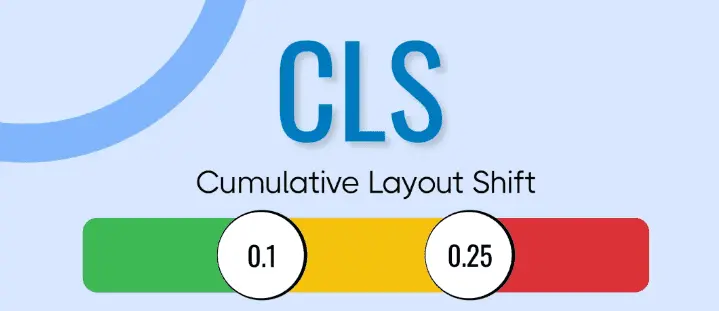
5. I Prevent Layout Shifts (CLS)
Unexpected movement on a webpage creates a poor user experience and negatively affects CLS scores.
Specify Image Dimensions
I always define width and height attributes for images so browsers can reserve the correct amount of space before the images load.
Reserve Space for Advertisements
Ads often cause layout shifts when they load. I allocate dedicated space for them in advance.
Use Font Display Swap
The CSS property font-display: swap allows text to remain visible while custom fonts load in the background.
Avoid Dynamic Content Insertion
I avoid injecting banners, forms, or other elements above existing content after a page has already started rendering.
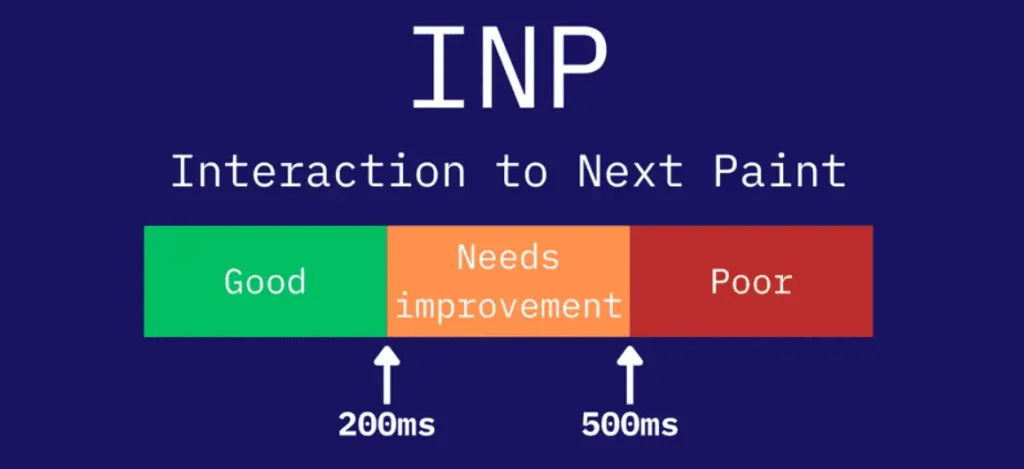
6. I Optimize INP (Interaction to Next Paint)
INP measures how quickly a page responds to user interactions such as clicks, taps, and keyboard inputs.
Remove Unnecessary JavaScript
Large JavaScript files can block the main thread and delay user interactions. I remove scripts that provide little value.
Delay Third-Party Scripts
Analytics tools, social media widgets, chat systems, and advertising scripts can negatively impact responsiveness. I load them only when necessary.
Reduce Main Thread Work
I minimize the amount of JavaScript processing required during page interactions to improve responsiveness.

7. I Use a CDN and Edge Caching
A Content Delivery Network distributes website files across multiple geographic locations.
Implement a CDN
A CDN serves content from locations closer to visitors, reducing latency and improving loading speed.
Use Edge Caching
Edge caching stores pages closer to users and reduces the workload on the origin server.
Optimize Global Performance
For websites with international traffic, a CDN often provides one of the biggest performance improvements.

8. I Optimize Fonts and Critical Resources
Fonts and render-blocking assets can significantly affect perceived page speed.
Preload Important Fonts
Preloading critical fonts allows browsers to download them earlier in the loading process.
Limit Font Variations
Using fewer font families and font weights reduces the number of files visitors must download.
Generate Critical CSS
Critical CSS loads the styles required for above-the-fold content first, helping pages appear faster.
Preconnect to External Resources
Preconnect allows browsers to establish early connections to important third-party resources.

9. I Use Object Caching for Dynamic Websites
Large websites, WooCommerce stores, and membership platforms often require more than standard page caching.
Implement Redis or Memcached
Object caching stores frequently used database query results in memory, reducing database load and improving response times.
Optimize Database Queries
I identify inefficient queries and remove plugins that create unnecessary database activity.
Reduce Database Requests
Reducing repetitive database calls improves both backend performance and front-end loading speed.
10. I Keep My Database Clean
Over time, WordPress databases accumulate unnecessary data that can affect performance.
Delete Old Post Revisions
Old revisions consume storage and can increase database size significantly.
Remove Expired Transients
Expired transient data should be cleaned regularly to prevent database clutter.
Delete Unused Plugin Data
Plugins often leave behind settings and tables after removal. Cleaning this data helps maintain database efficiency.
Optimize Database Tables
Periodic database optimization helps improve performance and reduce overhead.
11. I Monitor Performance Continuously
Optimization is not a one-time task. I regularly monitor performance to identify new opportunities for improvement.
Test With PageSpeed Insights
I use PageSpeed Insights to evaluate Core Web Vitals and identify performance bottlenecks.
Monitor Search Console Reports
Search Console provides real-world Core Web Vitals data collected from actual visitors.
Analyze Results With GTmetrix
GTmetrix helps identify large files, render-blocking resources, and other performance issues.
Test After Every Major Change
Whenever I install a new plugin, update a theme, or modify server settings, I run performance tests to ensure nothing has negatively impacted site speed.
Final Thoughts
WordPress Core Web Vitals optimization is not about installing a single plugin and hoping for the best. It requires a complete strategy that includes quality hosting, efficient images, caching, optimized code, database maintenance, content delivery networks, and continuous monitoring.
You may also like this 👉 SPEED UP WORDPRESS
I focus on improving LCP, INP, and CLS while keeping my website lightweight, efficient, and easy to maintain. By following these steps consistently, I can build a fast WordPress website that delivers an excellent user experience and performs well in search results for years to come.
For my other WordPress articles, please click on the link 👉 Wordpress
References and further reading
Editorial history
- Published
- Last updated
- Last reviewed

About Algorithm Man (Algo)
System Architect & Technical Consultant publishing tested, practical guidance on WordPress, SEO, programming, AI, and algorithms.
Experience and editorial standards




Leave a comment
Questions, corrections, or your experience with this guide — share them below.