
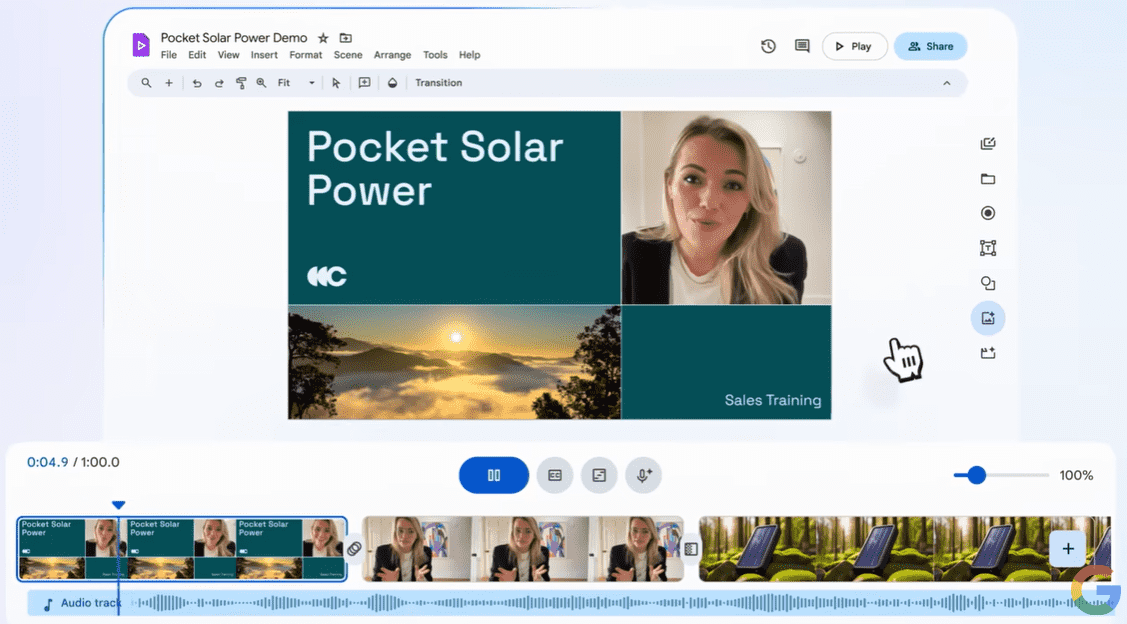
Verified July 18, 2026. Google Vids is a browser-based, AI-assisted video creation application in Google Workspace. It is designed for creating workplace videos—not for searching video libraries or monitoring video content.
What is Google Vids?
Google Vids uses a scene-based editor that works alongside familiar Workspace applications such as Docs, Sheets, and Slides. Teams can use it to create training videos, product explainers, announcements, demonstrations, onboarding material, and project updates.
A project can begin with a blank canvas, a template, uploaded media, a recording, a Google Slides presentation, or an AI-generated draft. The editor supports text, images, GIFs, stock media, video, audio, shapes, animations, transitions, and timed objects.
Recording and editing tools
The built-in recording studio can capture a camera, a screen, a camera with screen sharing, or audio-only narration. Camera recordings support a teleprompter. For supported English recordings, transcript editing can remove selected words, filler words, and pauses.
Slides can be imported as scenes, while speaker notes can be used as a starting point for scripts. Existing media can also be uploaded and arranged in the timeline.
Gemini and AI video features
The “Help me create” workflow can generate an editable outline, scenes, draft text, media suggestions, a script, music, and an AI voiceover from a prompt. Eligible accounts can also use Gemini to create images, scripts, multilingual voiceovers, avatars, and Slides-to-Vids drafts.
Google has expanded Vids with Veo-powered clips, image animation, reference-image workflows, avatars, and Lyria music generation. Availability and generation limits depend on the account type, Workspace edition, region, language, age, and administrator settings. Newly announced capabilities may roll out gradually.
Collaboration and export
Vids uses familiar Google sharing roles: viewer, commenter, and editor. Keeping a project as a Vids file preserves collaborative editing and comments. Finished work can be rendered to Google Drive, downloaded as MP4 or GIF, or exported privately to the owner’s default YouTube channel when that option is available.
Availability and plan differences
Basic Vids features are available with eligible Google accounts. Commercial availability includes supported Google Workspace Business and Enterprise plans, while consumer AI access is offered through eligible Google AI plans. Education, Nonprofit, Essentials, Workspace Individual, and personal accounts have feature-specific rules.
Gemini features and monthly AI generation quotas are not universal. Frontline plans do not include Gemini features in Vids, and managed work or school accounts remain subject to administrator controls. Always check the live availability matrix before choosing a plan.
Important limits
- A Vids project is limited to 30 minutes.
- A project can contain up to 50 video objects and 50 audio objects.
- Imported media can be larger or longer, but it must be shortened to the project limit before normal editing.
- AI-generated video settings, duration, resolution, orientation, and monthly quotas vary by feature and plan.
- Mobile browsers support playback, but editing and commenting support is limited.
- Google warns that generative results can be inaccurate or inappropriate and should be reviewed before publication.
Privacy and administration
Workspace administrators can control access to Vids, Gemini features, and personal avatars. Vids files can be governed through Google Drive retention and Google Vault controls. Eligible Workspace customer prompts and content are treated as customer data under Google’s Workspace terms; those protections should not automatically be generalized to every personal account.
Users should avoid placing confidential or sensitive information in product feedback. Organizations should review sharing permissions, retention settings, avatar access, and AI-use policies before deploying Vids broadly.
Who should use Google Vids?
Google Vids is most useful for teams that already work in Google Workspace and need a fast, collaborative way to produce internal or customer-facing videos. It is not a full replacement for professional nonlinear editing software when a project requires complex color grading, advanced audio production, visual effects, or long-form timelines.
Official documentation
References and further reading
Editorial history
- Published
- Last updated
- Last reviewed

About Algorithm Man (Algo)
System Architect & Technical Consultant publishing tested, practical guidance on WordPress, SEO, programming, AI, and algorithms.
Experience and editorial standards



Leave a comment
Questions, corrections, or your experience with this guide — share them below.